
OpenAI Upgrades ChatGPT Chrome Extension to Read Tabs and Automate Browser Tasks
OpenAI has expanded the capabilities of its ChatGPT Chrome extension, allowing the AI assistant to use information from open browser tabs and help use...
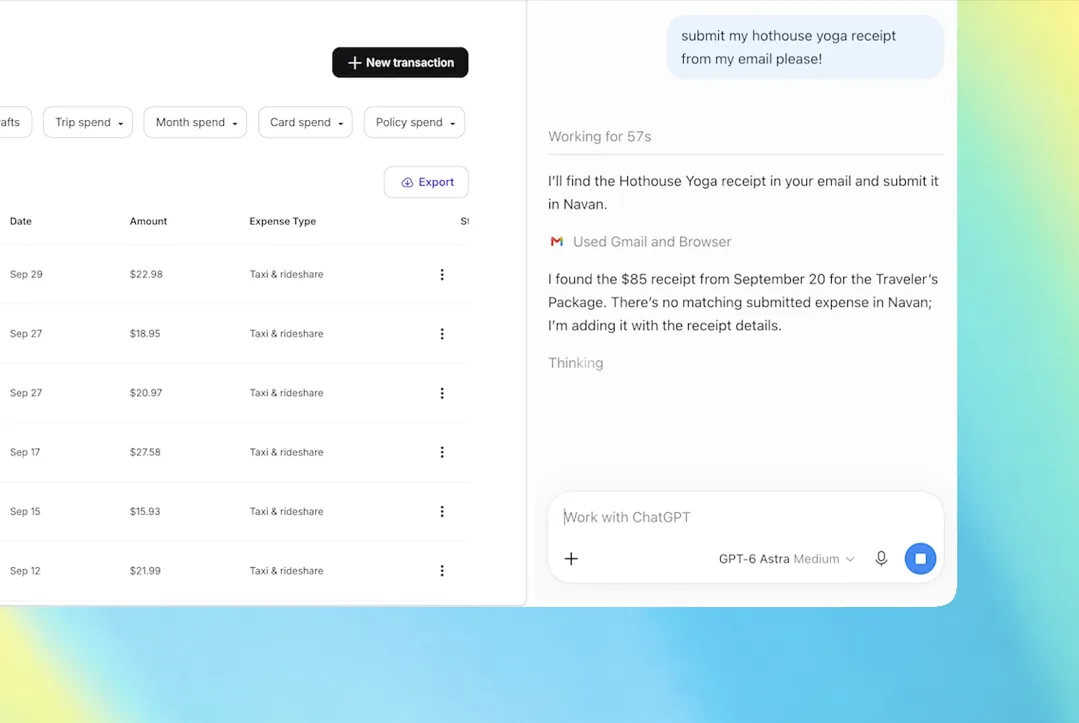
OpenAI has expanded the capabilities of its ChatGPT Chrome extension, allowing the AI assistant to use information from open browser tabs and help users complete tasks without constantly switching between webpages. The update also brings a more fully featured ChatGPT sidebar to the browser, combining conversations, research and selected browser actions in a single workspace.
The changes, announced on October 15, 2026, move ChatGPT closer to functioning as an active assistant within the browser rather than a tool that simply answers questions in a separate window.
With the extension installed, users can refer to Chrome from ChatGPT’s web or desktop app to provide context from their open tabs. This can help when comparing products, gathering information from multiple websites or preparing documents using details spread across several pages.
ChatGPT Can Work Across Multiple Open Tabs
One of the main additions is the ability to draw information from several open Chrome tabs. Instead of copying text from each webpage into a conversation, users can ask ChatGPT to examine the available pages and combine relevant details.
For example, someone researching a purchase could ask the assistant to compare products across different retailer websites. The response could bring together pricing, features and other information to make the options easier to evaluate.
The same capability could assist with professional tasks. Users might collect details about several service providers, prepare a comparison sheet or draft an email based on information found across multiple websites.
OpenAI has also highlighted form preparation as a potential use. ChatGPT can use details from an event brief to help complete a registration form, for example, while stopping before the final submission. This gives users an opportunity to review the information before taking the next step.
The usefulness of these features will depend on the content available in the open tabs and how accurately the assistant interprets it.
A More Capable ChatGPT Sidebar
The extension also improves access to ChatGPT while users are browsing. Its sidebar provides a more complete assistant experience, including access to conversation history in Chat and Work modes.
This reduces the need to move repeatedly between the active webpage and a separate ChatGPT window. Someone reading a report, researching a product or preparing a document can continue asking questions while keeping the relevant page visible.
Conversation history may also help users resume ongoing work without reconstructing the context from the beginning. For people who use ChatGPT for research or regular workplace tasks, keeping the assistant close to the material being examined could make common workflows more convenient.
ChatGPT Work Can Take Actions in Chrome
Beyond reading information, ChatGPT Work can interact with browser tabs to perform selected actions. These include filling out forms, sending messages, downloading files and organising open tabs into groups.
Such capabilities bring the extension into the growing category of AI agents that can carry out tasks rather than merely recommend what a person should do.
Google has been developing similar browser automation capabilities through Gemini, reflecting broader competition among technology companies to integrate AI directly into everyday software.
However, browser automation introduces additional considerations. A system that can interact with webpages may encounter private information, logged-in accounts or forms containing sensitive details. Users should therefore review what information they make available and carefully check consequential actions before allowing them to proceed.
OpenAI Shifts Its Focus Towards Existing Browsers
The expansion of the Chrome extension follows OpenAI’s move away from its standalone ChatGPT Atlas browser. Rather than requiring users to adopt a separate browsing environment, the updated extension brings more AI functionality into a browser many people already use.
That approach could lower the barrier to adoption, particularly for users who prefer to keep their established browser, bookmarks and working habits.
The larger question is whether AI-powered browser tools can perform multi-step tasks reliably enough to become part of everyday work. Reading multiple pages and filling out forms may save time, but accuracy, user control and appropriate handling of personal information will remain essential.
OpenAI’s latest changes point towards a future in which ChatGPT does more than explain information found online: it can help organise that information and act on it within the browser itself.
Related Stories


Reader comments are moderated as per Daily News Axis editorial standards.